

Must-Have Tools and Techniques for Project Managers in 2021
Introduction
Of course, there are many project management tools and techniques, and they vary among organizations. The tools and techniques discussed in this article are the ones I use, and I would be lost without them. It is important to always be on the cutting edge of project management, and I want to avoid anyone deriding me as a dinosaur project manager from the 80s or 90s.
It is a lot of work to stay current. My organization uses a vendor-provided, web-based application for our dashboard and project plans. This vendor provides emails with new trends in project management and free webinars. I get recordings of these webinars, too.
That is my main method of staying current. Like any industry, you stay current by reading the latest information, attending webinars, and collaborating with colleagues to avoid silos. Project managers must decide which tools and techniques apply to their organization and industry. I want to re-emphasize the following ones.
Must-Have Tools and Techniques for Project Managers in 2021
1. A project manager must have a dashboard exclusively for project management. It is standard procedure and your top project management tool. Dashboards provide a quick health check of your projects. They are also a visual representation of your projects, and a picture is worth a thousand words. Dashboards should provide the status of each project and links to other information and key performance indicators (KPIs), like return on investment, earned value, customer satisfaction, cost variance, and so forth.
Management likes dashboards since they save time. You will get fewer calls from colleagues asking about the project’s status. Benefits include more collaboration, better decision making, and more agreement on status/next steps. Some of your colleagues will remember your dashboard more than almost anything else about you as a project manager. (Is that a good thing?) Ensure your dashboard is web based and that everyone else knows about it. Remember, like the project plan, always keep your dashboard presentable, updated, and instantly accessible. Make it eye-catching, with pleasing colors and significant bling (see Figure 1).
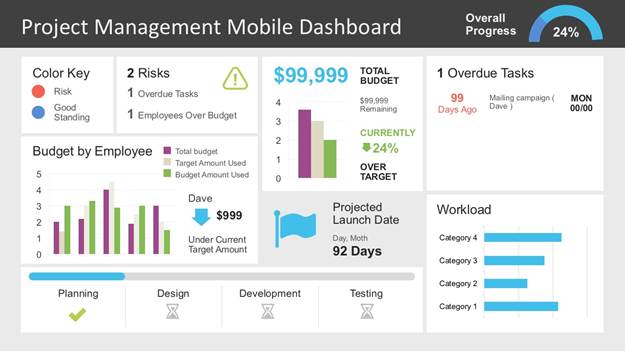
Figure 1: Project management mobile dashboard (SlideModel, 2020)
2. Do no be afraid of project plans. Some project managers do not like project plans. I cannot tell you how many vendors send me project plans and that is the last I ever hear about them. I get a project plan and the vendor never sends an updated one. Schedule a project status teleconference and always insist on updating the project plan to reflect the status. Avoid taking shortcuts, instead try to embrace the less desirable aspects of your job. Do not let vendors off the hook about keeping the project plan current.
Some project managers will do whatever is necessary to avoid using a project plan. Try not to be afraid of them. Break project plans into sections with subsections using colors, so the project plan is eye-catching. Try to avoid line after line of tasks in the execution phase. Instead, group similar tasks, like testing and training, by subphases. I know: Some project managers use other tools besides project plans, especially for agile. But I have not found anything superior to project plans.
I have seen many project plans without predecessors/dependencies—some project managers are afraid of them, but they are the glue that keeps the timelines in sync. Here is a refresher: finish to start (FS), start to start (SS), finish to finish (FF), and start to finish (SF). Again, use dependencies to determine the task order. The task that comes before is the predecessor. The task that comes after is the successor. You can have multiple predecessors for one successor task or a single predecessor for multiple successor tasks. Include Gantt charts since they are a good visualization for project manager presentations to the stakeholders—stakeholders often prefer viewing them instead of just lines of tasks in the project plan. The project owner is busy and consults that Gantt chart as a quick reference. Nothing makes a stakeholder’s eyes glaze over more than looking at endless lines of tasks in a project plan (see Figure 2).
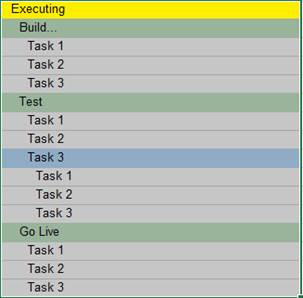
Figure 2: Task list (Boyer, 2020)
3. There is always a project charter, even if it is just an outline in an email. Sometimes it is a work order in your tracking system. But somebody must tell you what they want, when they want it, the project goals/outcome, budget, and so on. Spend as much time as necessary refining it until there is stakeholder agreement. Expect a fair amount of back and forth until you have a final project charter that clearly details all aspects of the project. Avoid just accepting whatever someone puts in front of you. Be proactive and polite.
4. An organization chart is important to help understand job titles and reporting relationships among stakeholders. I have seen project managers run projects without knowing who reports to whom, and that is a problem when resolving project issues. A project manager must know who can help resolve an issue with just a quick glance at an organization chart—and not waste time trying to figure it out when the clock is ticking.
5. Another useful project management tool is being proactive. Yes, project managers should be among the most proactive members in any organization. But after years at the same organization, a project manager can get stuck in a rut and slow down. Again, over time, you just seem to do the same thing every day and lull into inattention when you should always be trying to improve. Ask yourself every day if you are doing everything you can to be proactive. Take 10 minutes of your day to review each project and ask yourself whether you have done everything possible to make this project a success. Ask yourself, “Have I overlooked anything?”
6. Schedule a recurring meeting/teleconference with the project owner. It is amazing what people do not tell you unless you ask them. It is important to schedule a one-on-one meeting with the project owner to discuss the project status. Again, it is amazing what stakeholders will tell you one on one. Schedule that meeting with the project owner as soon as possible. Again, be proactive and polite.
7. Include swim lanes in your flowchart to visualize how the finished product will work. Again, a picture is worth a thousand words. The project manager or business analyst should provide a flowchart to visualize what is going to happen and when—and who or what is responsible for the action. Also, number each task in action in the flowchart. Stakeholders appreciate numbers to indicate the start/end and sequence of actions in a flowchart. No flowchart is complete without swim lanes and a number sequence (see Figure 3). Of course, a lot of my colleagues are visual and want to see a picture of how the project should work, and flowcharts provide it. Several times, a flowchart expedites a sign-off on the project charter instead of more delays and less time to complete an important project.
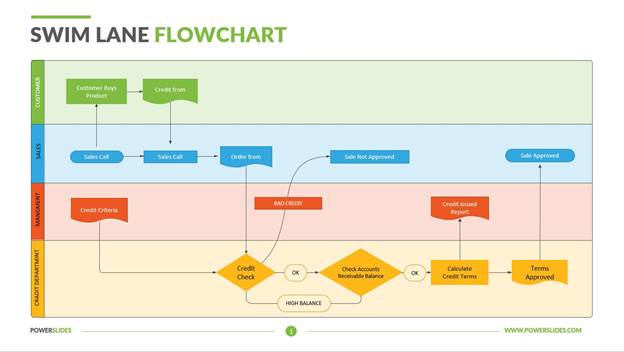
Figure 3: Swim lane flowchart (PowerSlides, 2020)
8. Insist on accountability. There is nothing more frustrating than constantly extending the start/finish dates of tasks because a stakeholder is too busy to finish them. Too many organizations allow stakeholders to delay tasks without any consequences. Stakeholders should use overtime to complete tasks. I know: Some stakeholders will look at you like you have lost your mind if you suggest overtime. Follow up with management as necessary and emphasize the impact to the schedule without the use of overtime.
9. Manage requirements. That is critical. If the requirements are not top notch, then it is all downhill from there. Schedule that requirements teleconference with the stakeholders and review the requirements. Do not trust stakeholders to thoroughly review the requirements on their own. Again, schedule that teleconference. Ensure that you review the requirements with the business analyst prior to that requirements meeting with stakeholders. Also, review the test cases with the quality assurance analyst.
10. Watch scope creep. Project managers often overlook asking stakeholders to break projects into phases. Of course, first deliver the most essential functionality, then the next essential functionality, and so on. Avoid being just an order taker and provide an updated budget and project completion date due to the impact from the scope creep/change request.
11. A project manager must have an issue log. Send it with the project status report. Again, work on the issues in the log. Do not just send it and forget it. It is crucial to resolve issues now instead of 5 minutes before a project status meeting. Schedule quick meetings with stakeholders who can help you resolve issues. Always send a meeting invite if you must meet with the stakeholder later instead of now. Again, send that meeting invite; otherwise, the stakeholder will forget and then there is another delay in resolving an issue. Remember, your stakeholders are your most valuable assets. Be brief and quick to the point, especially with executives.
Do not hesitate to ask for their help. Be respectful of stakeholders’ time. Check a stakeholder’s calendar to see when they are available. Do not phone stakeholders when they are in meetings unless it is an emergency. A project manager should use every opportunity to collect mobile phone numbers from stakeholders and vendors. A stakeholder’s or vendor’s desk number is of no value to me. I want mobile phone numbers. You can possibly find them in your company directory, but ask if necessary.
12. Send those project status reports, but then immediately follow up with a phone call or in person to discuss how to get the project back on track. Avoid just sending these reports and hoping a report recipient fixes the problem. Status reports (see Figure 4) are especially useful to show stakeholders that something must be done now to fix an issue, like being over budget or behind schedule. Yes, project status reports are useless if you just send them and do not follow up. Once more, be proactive and polite.
Include earned value in your project status report, and everyone will be impressed.
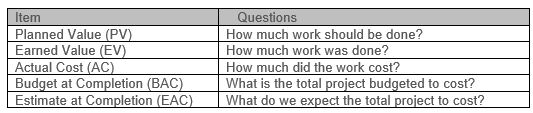
Figure 4: Sample project status report (Reichel, 2006)
Honorable Mentions


No comments:
Post a Comment